What’s the point of learning this stuff?
- From
- Josh W. Comeau
- Reply-To
- me@joshwcomeau.com
- Sent
- December 1, 2025

This issue of my newsletter was sent to newsletter subscribers.
Sign up to receive future issues!
Hi there!
Every week or two, I’ll hear from someone who has a question like this:
Your CSS course seem great, but now that AI can generate front-end UIs for us, what’s the point of learning CSS ourselves?
I always feel a bit awkward answering this question. On the one hand, I’m aware that I have a vested interest here, given that I sell courses that teach front-end development. But on the other hand, I genuinely believe that this stuff is still worth learning. So, my most honest answer feels a bit self-serving. 😅
In this email, I want to quickly explain why I believe that the world will continue to need software developers who understand the fundamentals of web technologies. I think I have some pretty compelling evidence, but you can decide for yourself.
Link to this headingUnderstanding the constraints
I did a little experiment over the weekend. Using the latest-and-greatest benchmark-topping Gemini Pro 3 model, I instructed an agent to construct the following UI:

This UI comes from my latest blog post on Subgrid(opens in new tab). It’s a surprisingly challenging UI to build, especially when using the proper semantic markup.
For this experiment, I did my best to pretend to be someone who didn’t know much about HTML/CSS. I wasn’t trying to evaluate how useful these tools can be for a skilled developer, I was trying to test the claim that it is no longer necessary to understand HTML/CSS.
The experiment was an absolute trainwreck 😅. I spent a maddening 12 minutes going back and forth with Gemini. This is as close as I could get:

After each prompt, I took a screenshot of the result and passed it to Gemini, along with a plain-English description of how I wanted the layout to be adjusted. I pretty quickly got stuck in a loop; every time, Gemini would confidently say "OK, it’s fixed now!", but really all it did was make some unrelated cosmetic tweak, like adding box-shadow. 😂
When I looked at the code, the problem was immediately obvious to me. It had been trying to use display: contents to solve for the fact that I needed individual list items to participate in the parent grid. Not only does this introduce accessibility issues, it also doesn’t solve the problem.
Now, let’s think about this for a sec. If I didn’t understand the mechanisms and limitations of CSS Grid layout, I wouldn’t really know if this was a platform issue (there just isn’t a practical way to build this UI in CSS) or a prompting issue (I am not giving clear enough instructions for what I want). If we don’t understand how layout works in CSS, we won’t know what the constraints are.
When it became clear that no amount of non-technical coaxing would get Gemini to build what I wanted, I decided to break my own rules, and I gave it the following much-more-precise prompt:
It still isn't correctly aligned. The problem is that you’re using
display: contents. Instead, use CSS subgrid so that a two-column grid structure is passed down to the children
With that prompt, all of a sudden, I got the UI I wanted:
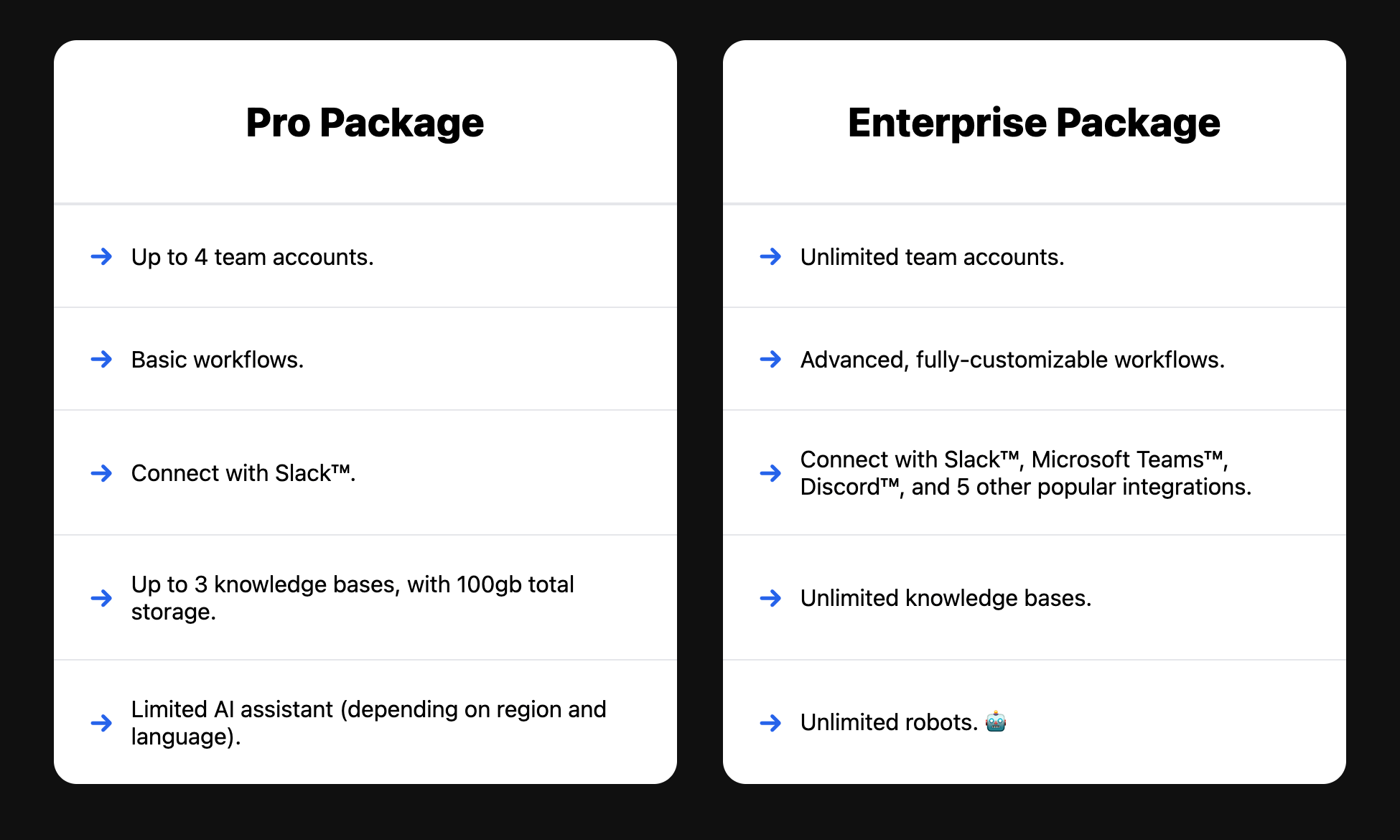
So, in the hands of someone technically proficient, it did well. It still wasn’t perfect; there was some weird stuff in the markup (like an empty <meta /> tag), and a few cosmetic differences with the mockup (like the missing heading background color, the misaligned bullets, or the claustrophobically-tight line height). But it got me 95% of the way there. Had I started with a technical prompt, I suspect I could have created this UI even faster with Gemini than if I wrote this code by hand.
But without that technically-precise prompt, I was spinning my wheels. I really tried to be as helpful as I could, explaining in clear language how I wanted the layout to be updated, but Gemini got stuck on the display: contents approach. Nothing I said seemed to work. This was really eye-opening for me; honestly, I wasn’t expecting to get stuck in a cul-de-sac as quickly as I did. 😬
And it’s important to stress that in terms of the project structure, this is the best-case scenario for AI. This was a brand new project with zero constraints, with no existing conventions or legacy code to navigate. I wasn't asking it to integrate design tokens or to use pre-existing components or deal with existing liabilities. I even gave it a screenshot, showing exactly what I wanted. This should’ve been easy!
If you use AI prompts in your workflow, I’d encourage you to repeat this experiment! See how much worse it is when you don’t use technically-precise language. And then imagine how much better it could be if you had even deeper technical understanding. ✨
I’ve repeated this experiment a few times now, and honestly, my subsequent attempts were a bit better than the one I shared above, but none of them yielded a production-ready solution; either it couldn’t get the vertical alignment right, or it did so at the expense of all semantics; no <article> wrapping around each card, no <ul> for the list of features. Just a bunch of <div>s.
Even if you consider it a valid solution without semantic markup (and, well, you shouldn’t), I think you’ll agree that understanding HTML/CSS is such an advantage. AI models will likely continue to improve, but I am deeply skeptical that they’ll evolve to the point that someone without domain knowledge can compete in the job market against someone who does have a deeper understanding.
Link to this headingShallow vs. deep knowledge
In this experiment, it was necessary for me to understand the fundamental mechanisms of the Grid layout mode in CSS. It wasn’t sufficient for me to provide a screenshot of the UI and to explain in plain English what the AI was getting wrong. I needed to provide technical direction, which meant that I needed to understand this stuff myself.
There is something interesting about this sort of workflow: the syntax becomes less important. I didn’t need to specify the exact CSS snippet (grid-template-rows: subgrid), but I did have to understand how subgrid works.
I think this is the difference between shallow knowledge vs. deep knowledge. Many developers learn CSS by memorizing snippets without really understanding them. They’ll copy/paste things like grid-template-columns: repeat(auto-fit, minmax(250px, 1fr)) as if it was a magic incantation. Pop that fella into your CSS and you’ll wind up with a dynamic grid that adds/removes columns based on the available space.
CSS becomes so much more powerful when you take the time to really understand it. A snippet will work in a narrow set of circumstances, but if you can build an intuition for how the language works, you can produce a much broader set of possible layouts and UIs.
The syntax was never the important part. Even before AI, you could quickly google to find the syntax. The important part has always been to have a robust and solid mental model of the underlying systems and mechanisms. Building software is so much more fun when you can rely on your intuition, rather than your memory.
Now that we have AI agents that can spit out the syntax on-demand, it’s even more important to focus on the deeper stuff. And that’s exactly what we do in my courses. ✨
In CSS for JavaScript Developers(opens in new tab), we learn the rules and behaviours of the different layout algorithms in CSS, including Flow layout, Positioned layout, Flexbox, and Grid. Using interactive demos and exercises and thought experiments and even a few minigames, you’ll build a deep understanding for how CSS works by poking and prodding at the language, seeing how things behave when different properties are applied.
And it’s the same philosophy in The Joy of React(opens in new tab), my comprehensive React course. We explore the thornier aspects of React’s rendering model, digging into the precise order of operations during an update. You’ll learn about hidden mechanisms like component instances, and build an understanding about things like why immutable state is so important. I’ll also share the “happy practices” I’ve developed throughout a decade of React experience, so that the applications we build stay maintainable even as they grow in size and complexity.
Without this sort of deep knowledge, you may be able to whip together a quick prototype, especially if you don’t care too much about the specific layout, or things like accessibility. But I think you’d struggle to contribute meaningfully to a significant real-world codebase, and I don’t see that changing any time soon.
Both courses are currently on sale for Black Friday, but that sale ends really soon. You can save a head-popping $500 if you pick them both up, in the “Joy for JavaScript Developers” bundle(opens in new tab). Or you can pick up one of the courses individually:
- CSS for JavaScript Developers(opens in new tab) is 40% off (US$399 US$239)
- The Joy of React(opens in new tab) is 42% off (US$599 US$349)
And honestly, whether you register for one of my courses or not, my big hope here is that you don’t buy into the hype of “you don’t need to understand stuff anymore”.
Link to this headingThe future of software development
Whenever anyone points out the very real limitations with today’s LLMs, the rebuttal is always “just wait! Today is the worst it’ll ever be!”.
At this point, I’ve been waiting for quite a while. Yesterday was ChatGPT’s third birthday! I remember people saying in 2023 that we wouldn’t need front-end developers at all within a few months. So, at a certain point, I think we need to start questioning the inevitability of this conclusion. 😅
AI tools have gotten a lot better since the early ChatGPT days, to be sure, but the same fundamental set of limitations have persisted. Nothing I’ve seen so far has convinced me that we’re on the cusp of having a sentient-level intelligence that can truly understand and adapt to the constraints in the same way that a deeply-knowledgeable human can.
I actually published a blog post about this, a few months back. It’s called “The Post-Developer Era”(opens in new tab), and it digs into why the job market has been so rough recently, and what the current trends suggest. It also includes some job-hunting tips, and I just updated it last week to include the results of a study about developer productivity and AI.
Anecdotally, it seems like things have been picking up in the last few weeks. Recruiters have started coming out of the woodwork; I’ve gotten more messages in the past month than I had in the previous year, and I’ve heard the same sort of thing from others. Nobody can predict the future, but personally, I feel pretty confident that software development jobs aren’t going anywhere. The tools we use will evolve, but our knowledge and skills will continue to have value.
That’s it for me!

PS. I actually wrote a blog post about AI(opens in new tab) back in March 2023, two and a half years ago. Here’s the main conclusion from that post:
“I think the most likely scenario is that tools like GPT-4 become integrated into developer tooling, and used to amplify what a skilled developer can do. Carpenters weren't replaced by power tools, accountants weren't replaced by spreadsheets, photographers weren't replaced by digital cameras / smartphones, and I don't think that developers will be replaced by LLMs.”
Honestly, I think that post still holds up pretty well! If you haven’t already seen it, I’d suggest checking it out. There’s some good tips on how to use AI as a learning tool.
This issue of my newsletter was sent to newsletter subscribers.
Sign up to receive future issues!
Interactive Courses
© 2018-present Joshua Comeau. All Rights Reserved.