A tool and a tip
- From
- Josh W. Comeau
- Reply-To
- me@joshwcomeau.com
- Sent
- April 30, 2026

This issue of my newsletter was sent to newsletter subscribers.
Sign up to receive future issues!
Hi there!
First, a quick reminder: my brand-new course, Whimsical Animations(opens in new tab), is now available! You can save 40% during the launch sale, which ends soon.
I have two things to share with you today: a tool and a tip.
The tool is something I built for the course. It allows you to create custom easing curves to use with CSS transitions and keyframe animations.
CSS comes with several built-in easing curves, like ease-in and linear, but honestly, they’re pretty underwhelming. In my own work, I frequently find myself creating custom curves that give my animations more character than the fairly-subtle built-in options.
My new tool is called Bézier Customizer(opens in new tab) and I’ve just published it on a public page, so that everyone can access it!
There are plenty of existing tools out there, like Easing Wizard(opens in new tab), but my tool has one pretty unique feature: it shows you where each frame will be painted, with the “ghost mode”.
To explain why this is useful, let’s consider the built-in ease-out curve:
The main idea with “ease-out” curves is that the element is slowing down throughout the animation. It’s constantly decelerating. This makes it useful for elements entering the viewport, like dialogs or toast notifications.
Unfortunately, the default ease-out curve is so subtle. It almost feels linear to me!
Let’s exaggerate it, by pulling the second Bézier handle all the way to the left:
That looks better, but it still doesn’t feel great to me. It’s moving way too fast at first, and yet it doesn’t settle to a stop in a very natural way.
I used to think this was an inherent limitation of Bézier curves, that they just couldn’t feel natural. And then I discovered the trick. ✨
First, let’s exaggerate the curve even more, so that it’s a ridiculous shape. Then, let’s increase the duration from 500ms to 1200ms:
This element glides to a stop in a super smooth, natural way. But, hm, the first half of the animation still looks funky. It almost appears that the element teleports, jumping to the midway point before moving smoothly.
If we enable the ghosts feature, we can see the problem. Aside from the starting position, we literally aren’t painting any frames in the first half!
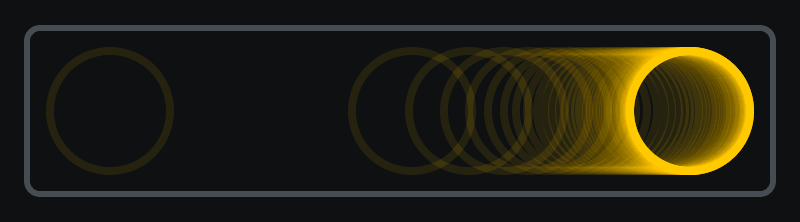
Since we can see exactly where each frame will be painted, we can tinker with the Bézier handles until there’s a good coverage:
Doesn’t that look friggin’ great?? I had no idea cubic Béziers could be this smooooth.
Interestingly, we’re breaking the rules here. The “best practices” say that animations should have short durations, never more than 500ms. In this case, the duration is 1200ms, more than double the maximum!
But it doesn’t feel like a 1200ms animation. Our element covers 90% of the distance in the first 350ms, and then spends almost a full second gliding over the final few pixels. So, really, I’d still consider this a pretty fast animation. It’s the same with spring-based animation; a spring animation might take two or three seconds to fully settle, but most of the motion happens very quickly.
So, this is my tip for you: if you want to come up with organic versions of the built-in timing functions like ease-out, exaggerate them to an absurd degree, and then compensate for it by cranking up the duration. You can use the “ghosts” feature on my tool to really dial it in, and make sure that the elements don’t teleport.
Here’s the link to the tool again:
And if you found this tip helpful, you’ll get so much out of my new course. We cover dozens of little tips like this as we build a variety of top-tier animations and interactions using modern CSS, JavaScript, SVG, and Canvas.
There’s still a bit of time left in the launch sale. You can learn more here:
That’s all for now! All the best,
PS. I know I’ve been sending a lot of email this week! If you’d prefer not to receive emails like this, you can mute emails related to Whimsical Animations.
This issue of my newsletter was sent to newsletter subscribers.
Sign up to receive future issues!
Interactive Courses
© 2018-present Joshua Comeau. All Rights Reserved.