For the past few years, all of the major browser vendors (Google, Apple, Microsoft, and Mozilla, along with Igalia and Bocoup) have been working together on Interop(opens in new tab), a project to improve universal browser support on web technologies. It’s been a remarkably successful effort; when a focus area gets added to Interop, it often winds up reaching near-100% support across all major browsers within a year. ✨
CSS Subgrid is a good example. Subgrid is a super-powerful extension to CSS Grid which enables entirely new layouts. It was implemented in Firefox back in 2019, but there wasn’t much movement with other browsers for years. It got added to Interop 2023, and by the end of that year, it was widely available across all modern browsers:
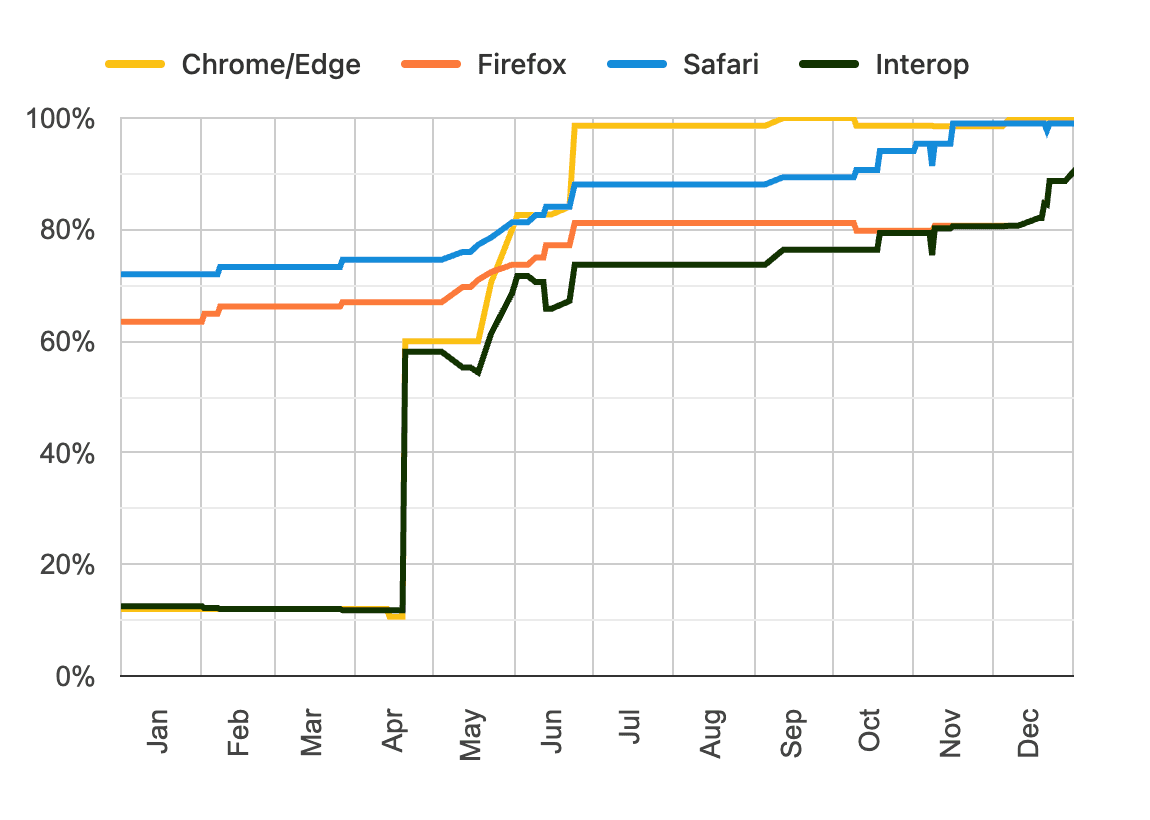
As we reach the end of 2026, Interop 2027 is currently being planned, and the team at Mozilla has created a ranking system(opens in new tab) for us to upvote our most-requested features. They plan on using the ranking data to decide what to include for next year’s Interop!
In this blog post, I want to dig into the top 10 features I voted for, to offer a bit of a preview of what CSS might look like within the next year. There will also be some little tips and tricks you can start using today!
Link to this heading1. CSS functions




More info on caniuse(opens in new tab)
One of the most exciting ideas is the proposal to add functions to CSS(opens in new tab):
/* Define a function: */
@function --gradient-to-transparent(--color, --direction: bottom) {
  result: linear-gradient(
    to var(--direction),
    var(--color),
    transparent;
  );
}

/* Invoke it: */
.elem {
  background: --gradient-to-transparent(red);
}

/* …which produces: */
.elem {
  background: linear-gradient(
    to bottom,
    red,
    transparent;
  );
}
If you’re familiar with JavaScript, this should feel pretty familiar. We define new functions with @function and specify the returned value with result.
There’s so much cool stuff we can do with this. Personally, the use case I’m most interested in is the ability to convert between polar and cartesian coordinates, a concept we use over and over in my Whimsical Animations course(opens in new tab):
@function --translate-polar(--angle, --distance) {
  result: translate(
    calc(cos(var(--angle)) * var(--distance)),
    calc(sin(var(--angle)) * var(--distance))
  );
}

/* Move this element 100px at a 45° angle: */
.particle {
  transform: --translate-polar(45deg, 100px);
}
This feels pretty “science-fiction” to me, but it’s already implemented in Chromium browsers, and if it gets added to Interop 2027, I think there’s very good odds that it could become widely available sooner rather than later!
Link to this heading2. Bevels and squircles with corner-shape
More info on caniuse(opens in new tab)
In CSS, we can use the border-radius property to round off the edges of our DOM nodes to create rounded rectangles. This property effectively adds a quarter-circle to each corner, connecting the 4 straight sides.
The corner-shape property is an exploration of alternative ways to connect the 4 sides of our DOM nodes. It provides a handful of new options:
Code Playground
Result
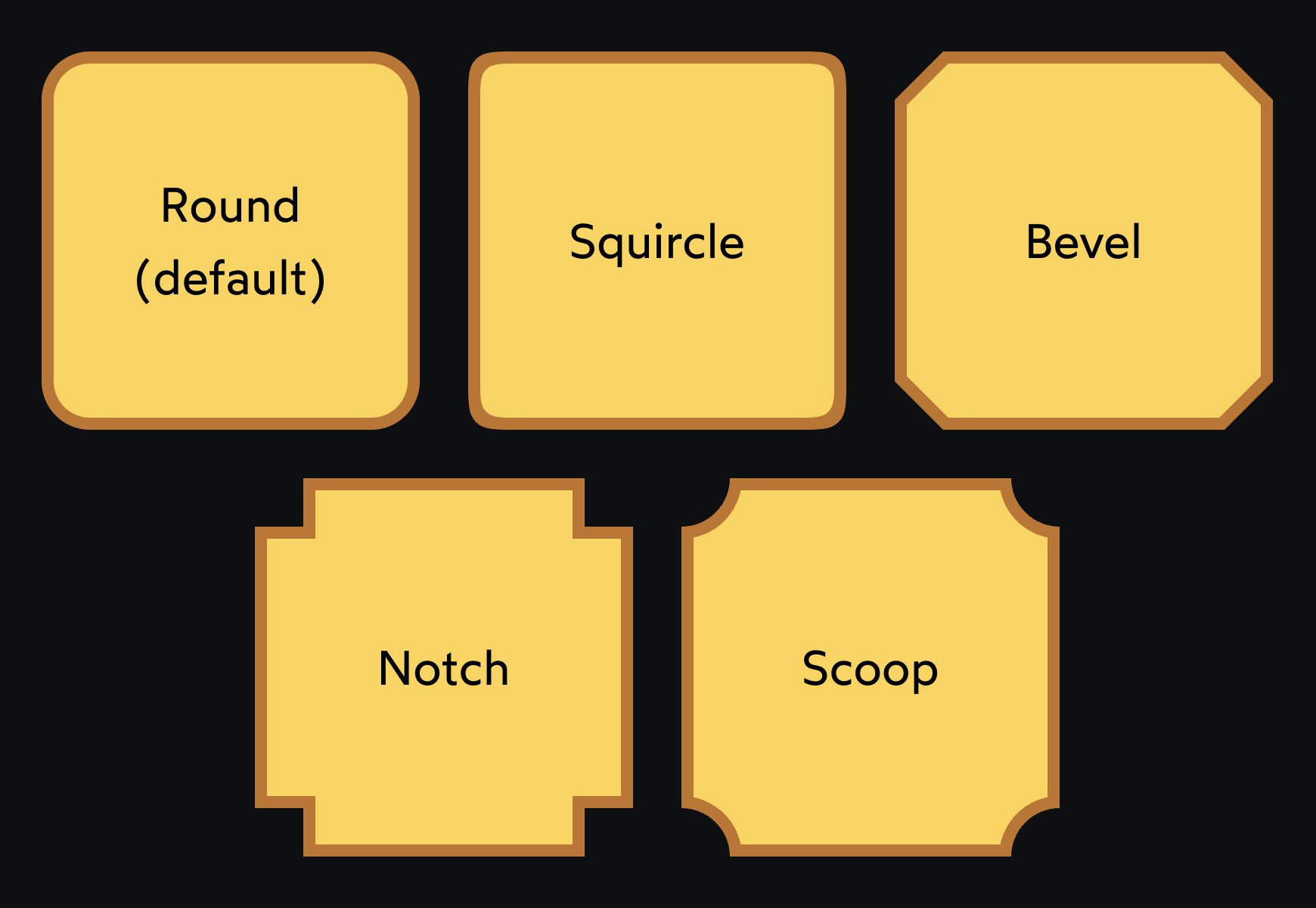
When I first heard about this property, I was most excited about squircle. If you’re not familiar, squircles are an alternative algorithm for generating rounded corners using superellipses. Apple has been making use of them for years because they produce smoother, gentler edges.
That said, after messing around with corner-shape for a while, I find myself using corner-shape: bevel a ton. It’s great for creating video game / sci-fi UIs. Here’s a little preview of a side-project I’ve been working on, with tons of corner-shape: bevel:
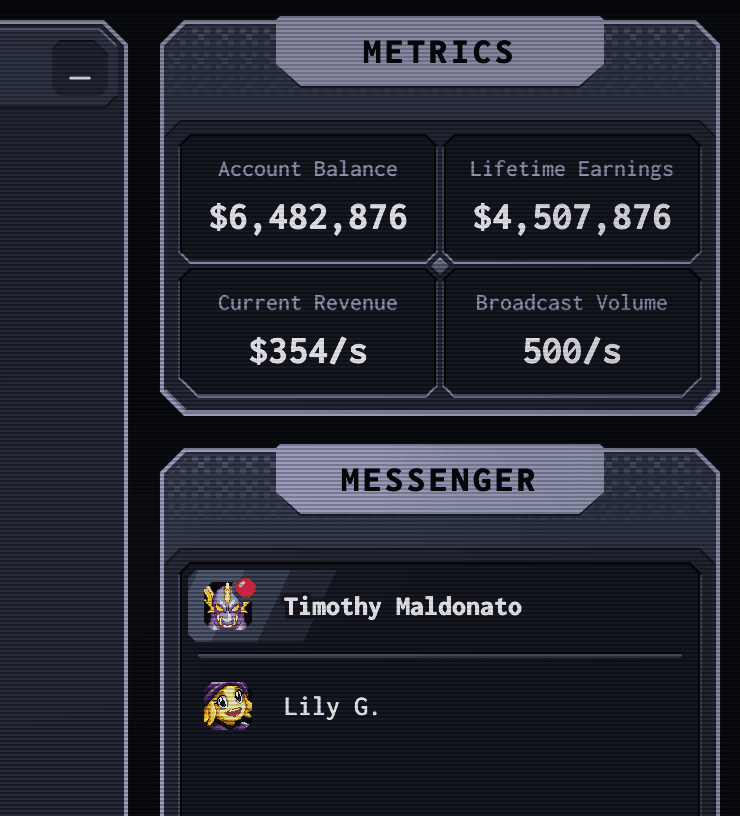
We’ve technically been able to do stuff like this with clip-path or masks, but unlike those features, corner-shape actually changes the shape of the border-box. This means that our borders, outlines, and box-shadows will correctly follow the altered corner shapes!
And even though this property isn’t available in Firefox/Safari (as I write this in October 2026), I think it’s reasonable to start using it today. It’s a perfect progressive enhancement!
Link to this heading3. Infinite possibilities with border-shape
More info on caniuse(opens in new tab)
In addition to corner-shape, there’s a separate proposal for border-shape(opens in new tab), which is essentially a lower-level version that allows us to draw the border ourselves.
I covered this property in depth in a recent newsletter issue, so I won’t repeat myself too much here. To summarize, border-shape lets us create whatever border shape we want using straight lines, arcs, and Bézier curves.
I used this property recently to draw this card with a big circular scoop at the top:
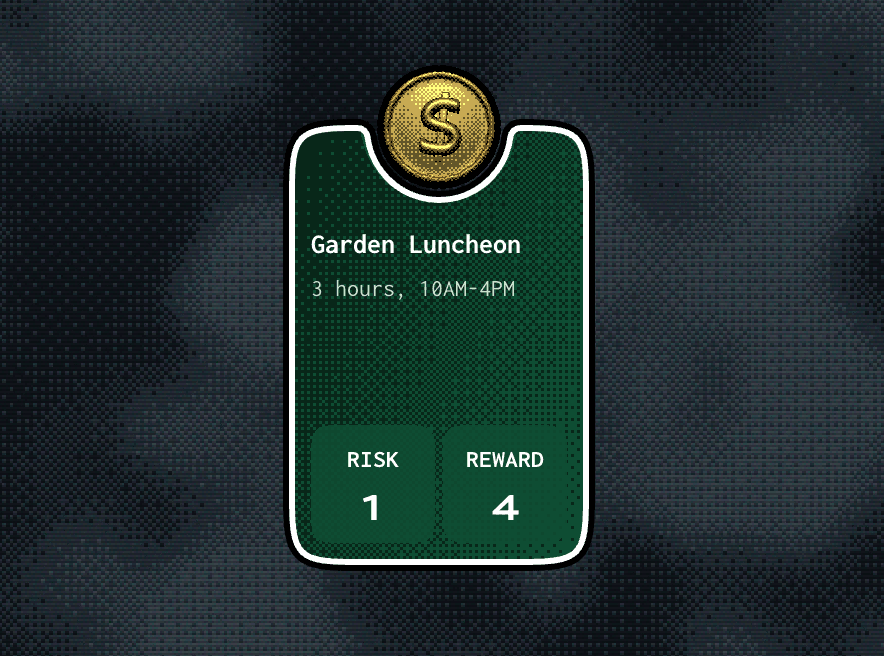
Like corner-shape, this property changes the element’s actual border box, so borders/outlines/shadows will trace it correctly. I drew the shape I wanted and then added a white border and black outline to achieve the effect shown above!
We can even animate between differnt border shapes, like I do in this clip:
You can learn a bit more about this property in my newsletter issue on the subject.
Link to this heading4. Anchored Container Queries
More info on caniuse(opens in new tab)
I recently published a blog post on Anchor Positioning, one of the most exciting modern CSS features (which was actually prioritized in Interop 2026, and is now widely available!).
The Anchor Positioning API allows us to anchor one element to another. For example, we might anchor a floating tooltip element to its trigger, so that no matter where that trigger is on the page, the tooltip will always be connected to it.
If you’ve ever tried to solve this sort of problem yourself, you know it’s surprisingly tricky. For example, we might want our tooltip to float above the anchor, but what if the anchor is near the top of the viewport?
The tooltip fits comfortably.
The tooltip’s getting cut off!
The original Anchor Positioning API gave us most of the tools needed to solve this problem easily in CSS. It allows us to specify fallback positions; if the target element doesn’t fit above the anchor, it can flip automatically to the bottom.
The only thing missing was the ability to tell whether or not the target had flipped. We had no way to know, in CSS, whether the target element is currently sitting above or below the anchor, whether it’s using the default or fallback position. For tooltips, this is a problem because we typically want to add a little protrusion that points towards the anchor.
The “Level 2” version of the Anchor Positioning API includes a new type of container query that allows us to check whether the target element is using a fallback position or not. You can learn more about it in my Anchor Positioning blog post, or check out the Interop 2027 proposal(opens in new tab).
Link to this heading5. CSS inherit() function
So honestly, I had never heard of this proposal(opens in new tab), and as far as I can tell, it isn’t implemented in any browsers. It’s not even listed on caniuse, so I can’t display one of those little widgets!
And yet, the moment I saw it, it became something I needed to have. 😂
As you might know, the inherit keyword in CSS allows us to pass a value down from the parent, even if that property isn’t typically inherited:
Code Playground
Result
This is a useful little trick to reuse values, but I frequently wind up discovering that it doesn’t quite work. For example, suppose we have nested border radiuses (or is it radii?):
Code Playground
Result
In order for nested border radii to look correct, we need to reduce the amount of rounding on the inner radius. So I don’t exactly want to use the inherited value; I want to transform it.
That's where the proposed inherit() function comes in. It will pluck the inherited value and allow us to modify it using calc():
p {
  border-radius: calc(inherit() - 4px);
}
Given how preliminary this feature is, I’d be a bit surprised if it makes the cut for Interop 2027. But I hope we do get this feature in the future! It seems super useful. 😄
Link to this heading6. Scroll-triggered animations
More info on caniuse(opens in new tab)
In my blog post on scroll-driven animations, we explore how we can scrub through a keyframe animation by scrolling. For example, we can use it to fade an element in as it traverses the viewport:
Scroll-driven animations were part of Interop 2026(opens in new tab), and it’s been successfully implemented across all browsers. In addition to Scroll-driven animations, however, there’s a separate proposal for scroll-triggered animations.
With scroll-triggered animations, the goal is to trigger a keyframe animation when the user scrolls to a specific point, like a proximity sensor going off. At that point, the animation runs normally over a specified duration.
We can currently implement scroll-triggered animations using the IntersectionObserver API in JavaScript, but it’s kind of a pain. It’ll be super nice when we can use CSS for both scroll-driven and scroll-triggered animations, since they each have their own use cases.
You can learn more about scroll-triggered animations in this wonderful article by Bramus(opens in new tab).
Link to this heading7. CSS reading-flow and reading-order
More info on caniuse(opens in new tab)
I’m currently working on a which involves a dynamic grid-based layout. Items are arranged very differently on desktop vs. mobile:
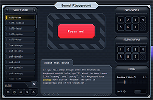

This is one of the great things about responsive CSS, but it leads to an unfortunate side effect: tab order is always based on the DOM order, not the visual order. So, if someone uses assistive technologies to navigate between elements, that navigation order will always be the same, even as the layout changes dramatically depending on screen size.
On desktop, the first visual item is that list of Redacted on the left, but on mobile, the first item is that big red button. Whichever element comes first in the DOM will be the first item to receive focus, which will invariably be wrong for a percentage of our users.
Thankfully, the new reading-flow property grants us a solution to this problem, and there’s a proposal for Interop 2027(opens in new tab).
The basic idea is that we can specify that the tab order should follow one of several visual orders:
.grid {
  display: grid;
  reading-flow: grid-rows;
}
There are values for both CSS Grid and Flexbox, and if you need even more control, the reading-order property allows us to create a custom order, sorta like tabIndex in HTML.
This property has been championed by one of my personal heroes, Rachel Andrew. You can read more about it in her blog post on reading-flow.
Link to this heading8. Keyword size animations with interpolate-size and calc-size()
More info on caniuse(opens in new tab)
A long-standing pain point on the web has been the inability to animate between keyword values like auto. The interpolate-size property solves this problem, and there’s an Interop 2027 proposal(opens in new tab) for it, alongside the related calc-size() function.
The most common use case for this feature is to animate between height: 0 and height: auto, for creating collapsible accordion-type UIs:
Code Playground
Result
The interpolate-size property is not yet supported in your browser. Here’s what it looks like in supported browsers:
This is admittedly kind of a complex example, requiring other niche-but-well-supported CSS like transition-behavior. But the key thing is that interpolate-size: allow-keywords makes this sort of transition possible.
This proposal has been kicking around for a while now, and it’s been implemented in Chrome since 2024, so hopefully it makes it into Interop 2027!
And even though it isn’t yet available in all browsers, we can start using it today as a progressive enhancement. Just be sure to gate the transition behind a @supports query, since otherwise a brief delay will be added to unsupported browsers.
Link to this heading9. CSS gap decorations
More info on caniuse(opens in new tab)
One of the things that makes CSS Grid layout unique is that the grid children are positioned using rows/columns defined entirely in CSS. In every other layout mode, elements are positioned using other elements! In Table layout, for example, every grid cell has an associated <td> or <th> element.
There are a lot of upsides to CSS Grid, but one of the downsides is that it’s not as easy to add borders between grid cells. If a grid cell is empty, there’s no element to slap a border: 1px solid on!
The gap decorations proposal(opens in new tab) introduces a new set of CSS properties that will allow us to use a border-like syntax on the grid itself. Check this out:
Code Playground
Result
The rule property is not yet supported in your browser. Here’s what it looks like in supported browsers:
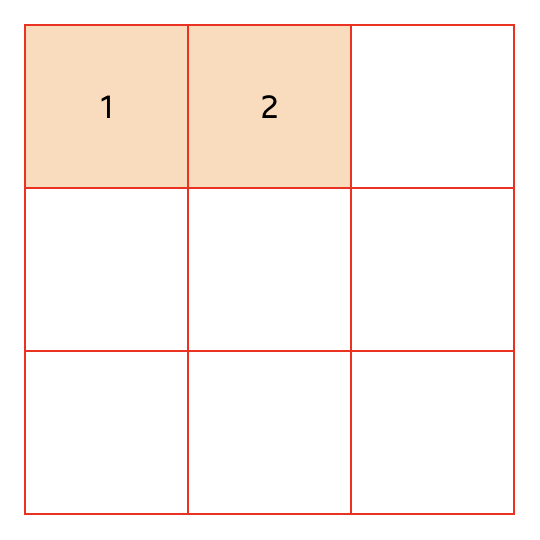
Like border, the rule property is a shorthand property that allows us to specify the width, color, and style (dashed/dotted/solid) of the line. We can also use row-rule and column-rule if we only want to draw lines between each row or column.
Link to this heading10. Scroll state container queries
More info on caniuse(opens in new tab)
When working with position: sticky, have you ever wished there was a way to know whether the element was currently “stuck” or not? For example, maybe you’ve wanted to change the background color of a sticky header when it becomes stuck to the top of the viewport.
This proposal(opens in new tab) is for the implementation of a new type of container query, one that matches when a position: sticky element switches from its typical in-flow position to being anchored to the viewport. Check it out:
Code Playground
Result
Here’s what this looks like, if this feature isn’t yet supported in your browser.
Interestingly, this new API isn’t just for sticky positioning; we can use it to query all sorts of scroll-related state. For example, we can tell whether a scroll container is scrolled to the top/bottom, which can be useful for showing those scroll-indicating gradients:
Code Playground
Result
If there's the ability to scroll up, scrollable: top matches, and so we reveal the pseudo-element floating over the top of the content. When scrolled all the way up, scrollable: top no longer applies, and so the gradient is hidden.
Here’s what this looks like in supported browsers:
Link to this headingConclusion
As we head into Interop’s 7th year, it's undeniable that the project has been a smashing success for the web. I’m so glad they keep building on this success!
I know it’s kind of a weird time right now for web developers, and many of us are wondering whether we even need to care about this kind of stuff anymore. If we’re delegating all of our work to LLMs, do we still need to keep up with the latest-and-greatest CSS features?
Personally, I think it’s more important than ever. We can’t expect LLMs to use modern CSS features when so much of their training data is years old. Most of the features I’ve shared in this post can be used today as a progressive enhancement, and if history is any guide, many of them will soon be widely available.
If we want to build the best possible user experiences, we’ll need to guide our agents to take advantage of modern web features, which requires us to know about them! This is something I dug into in a newsletter issue earlier this year: deep technical expertise remains incredibly worthwhile in the agentic era.
Finally, I’d strongly encourage you to rank your own top choices(opens in new tab)! There’s a ton of great proposals in this list, including some exciting JavaScript APIs like Temporal which didn’t make sense to include in this blog post.
Last updated on
October 20th, 2026